Goodreads for Writers (Build a Social Media Platform)

Goodreads for writersDo you daydream about a massive virtual library where lovers of books rub shoulders and authors receive free privileges and promotional opportunities? Well, dream no more. Such a site exists. Surprisingly, many writers ignore Goodreads.

A basic membership affords even unpublished writers the opportunity to include a photo and profile information, make friends with readers and other writers, share book recommendations and reviews, create their own virtual bookshelves. and join groups and forums (including groups of readers who love books in their genres).

Published authors can add the following privileges:

Author Page

It’s likely you will find your book by title in the site’s database. If you don’t find it, it’s not too difficult to add it using the “Find Books” tab. Once you locate your book, you will find a link that asks whether you’re the writer of the book. Click that and follow instructions to set up your Author Page.

Bio

On your author page, you can include a biography and list your books, link to your website and blog, indicate your genre(s), and upload a picture. Take pains with this information, since visitors to your page will notice it before they scroll down to read anything else.

Blog

You can blog right in Goodreads or automatically feed updates from external blogs to your page and into the news feeds of your friends and fans. The whole post won’t appear, but just the first few paragraphs with a link to your blog site. This is one way to lead readers back to your website and expose them to purchase information for your book.

Events

You can list events like your release date, blog tour stops, or book signing schedule to keep your friends and fans informed.

Videos

Set book videos, author interviews, book readings, or other promotional videos from YouTube or another online video service to display right on your Author Page.

Writing Samples

If you have an author page, you can include samples of your writing and reviews of your books for others to read. 

Quotes

You can share favorite quotes from books you love, including your own! Give readers a taste of your writing and they may just purchase your book and keep on reading.

Fans

Your Author Page includes a place where readers can sign up to be your fans. You will then appear in the “Favorite Authors” section of their profiles and they will receive updates from your Author Page. 

Status Updates

Goodreads has a status update box that allows you 240 characters to comment on topics of your choice. Your update will show up in the newsfeeds of your friends and fans. Starting a discussion about an author who writes books similar to yours is a great way to engage with readers who might also enjoy your books. The update box is a little difficult to find. In the top menu bar, click “home,” and then look in the right sidebar for the text link entitled “general update” under the “what are you reading” header. Click the link and an update box should appear. 

Groups and Forums

Join reader groups and enter into their discussions to connect with readers within your genre. Remember, though, not to push your books. Engage readers by joining in the discussions at hand and they may click on your name link to go to your Author Page and find out all about you and your books.

Giveaways

If it’s still within six-months after your book’s release date, you can set up a giveaway of your book through the “First Reads” program. This gives you the opportunity to put a brief synopsis in front of those who participate.

Special Strategies

The way Goodreads is set up yields intelligence data for authors. For instance, you can find a book similar to your own, click on its title, and learn which of your friends and fans have read it. You can search for a similar book and find active discussions about it in reader groups.

Homework

If you don’t have a Goodreads account, sign up for one, upload a photo and fill out your profile information. If you are a published author, apply for your author page and schedule some time to set it up.

I’ve touched on some of the strategies available to writers who use Goodreads. Do you have more ideas? How do you use Goodreads?

LinkedIn for Writers (Build a Social Media Platform)

Linked In for Writers via @janalynvoigt for Wordserve Water Cooler
This is a pin-friendly image!

When deciding where to focus online, most writers veer toward Facebook, Twitter, and Pinterest. Developing a presence at those sites can be a great idea. However, with 250 million users worldwide, LinkedIn carries a clout all its own. Chances are you think of LinkedIn as a network for job seekers, and while it does function in that capacity, it offers other benefits to writers.

Reach Readers

Although LinkedIn’s focus is business-to-business, don’t discount it as an avenue to reach readers. I personally experienced a spike in book sales after putting the word out on LinkedIn about DawnSinger (Tales of Faeraven 1). The link I posted had a lot of shares, which means my network kicked in to help. As members of my network shared my update to their networks, they increased its impact exponentially, creating additional exposure for my book. This is social networking at its best. Just remember that giving more than you receive will help you tap its power. (It’s also a great way to live.)

Extend Your Network

LinkedIn allows you to introduce yourself to those in the networks of your network. This can be a powerful tool for growing your sphere of influence. Be careful about approaching agents and editors this way, though. It’s best to send them a contact request after an in-person meeting.

Give and Receive Endorsements

LinkedIn lets you easily endorse people you respect for their professional skills. This also means that others can do the same for you. While you can request that others endorse you, use this tool wisely. If people don’t know you or your work, don’t send them an endorsement request.

Discover Who Views Your Profile

It’s fun to click a sidebar link and discover who has recently visited your profile. While those who upgrade to a professional account receive more information, even those who use a free plan can see a few names. As an example, recent visitors to the LinkedIn profile for Janalyn Voigt included a librarian, another author and speaker, a digital publisher, a barbershop manager, and a Los Angeles-based writer and editor. In the past I’ve also caught a film producer and agent checking out my profile. These people can represent contacts you may want to follow up with.

Link Your Blog

LinkedIn’s blog link tool enables you to feed your blog to your LinkedIn profile. This helps you brand while giving your blog additional reach.

Automatically Update from Twitter

Feed your Twitter updates to LinkedIn. Go to settings to enable this feature.

Conduct Polls

Use the LinkedIn polls application to gain insights that can help you determine what to write, how to promote, and where to find your target audience. You can integrate your LinkedIn polls to Facebook or Twitter and also embed them in your website.

Improve Your Website’s SEO

Be sure to include a link to your website and/or blog in your profile. Garnering links back to your blog from high-authority sites helps raise its visibility in search engines. A good search-engine ranking means that when people search the internet for keywords within your topic, your site shows as close as possible to the first page of their results. This is known as search engine optimization, or SEO.

Focus on Business

One of my author friends centers his online social networking at LinkedIn more than at other sites. When I asked him why he prefers LinkedIn, he answered that it’s all business. Since he’s had to break himself of an online gaming habit, this makes sense for him. LinkedIn’s business focus extends even further than not featuring games, and that’s good news for writers in a lot of ways. On LinkedIn you don’t “friend” or “follow” people, you add them into your network. Having an established network means that you can connect on a strictly-business level with (to name a few) publishing professionals (such as agents and editors), experts in fields you need to research, technical experts who design websites or make book trailers, and other authors willing to cross-promote.

Join Relevant Groups

LinkedIn is another place to connect with others on topics of interest to your author brand. You can also participate in groups of writers to talk shop. As an example, I’ve used LinkedIn groups to compare notes with other writers in an effort to discover where to focus promotional efforts. A simple search on LinkedIn will turn up groups to consider joining. If you’re new at writing, you may want to check out a post that gives details on 20 sites of interest to aspiring authors.

Follow Publishing Houses and Agencies

Use the follow companies LinkedIn feature to keep tabs on publishing houses and agencies. As a bonus, you can see how you are connected to these companies, which can give you contact leads.

How to Proceed with LinkedIn

Start by creating a free account, and then fill in your profile completely, using targeted keywords (see the section, above, on improving website SEO). Once you’ve done this, send invitations to connect with all your contacts and concentrate on growing your network in the ways mentioned throughout this post. I’m sure you’ll agree that LinkedIn is a powerhouse for writers.

What I Want on my Pizza

…or in my queries.

The hubby and I have been eating a lot of pizza lately. Namely because it is rather okay to eat when cold, and new babies often necessitate cold-food eating. My favorite pizza is Hawaiian–Canadian bacon and pineapple. Yum! Although, I won’t turn my nose up at pepperoni or mushroom and black olive. Still, even the thought of a Hawaiian pizza makes me drool a little bit.

Similarly, while a well-written query letter is edible, there are certain queries that make me pay a bit more attention, that make me email the author back asking for a partial, a proposal, or even a full manuscript.

I have had several conversations with authors about what stands out to me when I am reading through the slush pile. Sometimes it’s a certain spark–something in the tone of the actual letter. Or sometimes it is in the fantastic writing, itself–the story, a certain character, the beautiful language. However, there are also a few tangible things that really impress me, as well.

1. Numbers Both online and in person. In other words, platform. An author needs to be connecting online via Facebook, Twitter, Pinterest, Instagram, his website, his blog, his online newsletter, etc. If all of those overwhelm you, pick two or three that you can grow consistently. Start with ten minutes a day. He also needs to be speaking (and keeping track of how many people attended each event) as well as writing for print publications. If the author is a nonfiction writer, then he needs to focus on non-fiction articles. If he is a novelist, then aim for literary journals.

2. Names I often request a partial or a full if the author mentions that a certain celebrity or high profile person is willing to endorse her book. If that person has the endorsement included in the email, then I am even more impressed. Obviously, most of the endorsements come after the book already has a publishing house, but it never hurts to have those connections ahead of time.

3. kNowledge 🙂 When authors mentions things I like, information gleaned from my biography, I take a closer look at their query letter. I don’t mean that you should be a creepy stalker for the agent you are interested in (that would probably have the opposite effect), but you should research the agent. Know what she wants to read; know what interests her.

4. Names Oh, I mentioned that one before? Spell the agent’s name correctly in the query letter. My name has an ‘h’ at the end. I have rejected authors because they spelled my name incorrectly. All right, I am not that cruel–I did read through the query letter before rejecting, but it did nothing to gain brownie points, and speaking of brownies…

5. Nuts I don’t like nuts in my brownies, but I do like chocolate chips. So, you know, if you really want me to take a look at your query, be sure send me some. I’m kidding. Kind of.

Just like most people will eat any kind of pizza, every person has his/her favorite. Each agent has certain things that he looks for in query letters, but building your platform, connecting with high profile people, and doing your research about that particular agent will definitely help your query letter stand out among the hundreds in the slush pile.

Questions: What tips/tricks have you learned to help your query letter shine? Did they work? What hasn’t worked for you?


To Tweet or Not to Tweet (The Social Media Platform Question)

twitter-bird-light-bgs

Twitter is a top social network and one of the sites a prospective agent or publisher is likely to check when evaluating a writer’s online presence. This factor alone makes it worth investigating, but there’s more. Once you understand how to use it properly, Twitter can drive traffic to your site and customers to your books.

What is Twitter?

Twitter is an information network with real-time immediacy. Trending stories often break first on Twitter. It’s also a social networking platform where people from all over the world post short updates. Tweets, as these updates are known, take little time to compose. Your wall, made up of brief Tweets, is quick to scan. On Twitter you can create lists of people and make them public or private. It’s possible to join ongoing group conversations (like #AmWriting or #WriteTip). If you have a Facebook account, this should all sound familiar. Think of Twitter as “Facebook Light.”

Because of the character limitations (just 140 characters per Tweet), you don’t need to spend a lot of time maintaining Twitter. Tweets cover, among other things, personal updates, conversations, commentaries on something in the news, interesting posts, original limericks, and even entire books painstakingly Tweeted in numbered, sequential order. When it comes to composing Twitter updates, you’re only limited by your imagination.

Tweets can be prescheduled via social media dashboards like Tweetdeck, Social Oomph, Buffer, and Hootsuite. I have used all of these at one time or another and now use them all for different features. There’s also Twuffer, which I have not tried, but many people swear by it. Which you choose is really a matter of preference. I suggest you start out with Hootsuite, since its interface is easiest for the beginner. As a bonus, you can schedule updates for Facebook, Google+, and LinkedIn through Hootsuite as well. I use the URL shortener at Bitly.com and also via Buffer because these sites give me the ability to track analytics for the links I post.

Twitter’s about page is informative and even suggests various ways to use it. The brief video at http://fly.twitter.com is well worth watching. There’s also a set of instructions helping businesses learn to build a community at https://business.twitter.com. If you’re a mobile user, go to https://twitter.com/download for the apps you’ll need. Clearly, how much you get out of Twitter depends on you.

Getting Started on Twitter?

I won’t go into a lot of detail here because Twitter’s help topics are so awesome you should have no trouble finding your way. Learn how to set up your account here: https://support.twitter.com/articles/100990-how-to-sign-up-on-twitter.

For branding purposes and to present yourself as professional, I suggest you use your author name as your handle. Capitalize your first and last name for better readability. My twitter handle, for example, is @JanalynVoigt rather than @janalynvoigt.

Be sure to upload a profile image. Many people, myself included, won’t follow accounts without a profile picture because this is a telltale sign of a spammer.

Don’t be afraid to poke around Twitter and familiarize yourself with its many aspects. Third-party Twitter applications abound, but don’t get carried away discovering them or you may burn out on Twitter before you start. It’s best to start simple. Also, be careful when it comes to third-party applications. They shouldn’t need your email address or Twitter password to function. After you’ve granted permission to an application to access your account, if you don’t intend to use it again, it’s always a good idea to go into your Twitter settings through the gear icon on your profile page, select apps from the menu on the left, and revoke its access to your account.

What if you just don’t “get” Twitter?

I truly understand the confusion of not knowing how to relate to others on Twitter. It took me several years to truly grasp how to use this particular social platform. I might not have kept trying except that much of my website traffic came from updates about my blog posts that I made to Twitter. I only wish I’d discovered sooner that the character of my interactions, rather than the nature of Twitter, was the problem. Accusing Twitter for my failure to connect through it was akin to blaming a forest fire on a careless camper’s match. For those who persevere, Twitter can prove quite a powerhouse.

I didn’t consciously decide to use Twitter as an outlet to promote my writing without investing anything of myself in my followers. In fact, I tried periodically to get people to “talk to me,” but I wasn’t successful. I first had to figure out some basics, and I’m happy to share them with you.

To get people to talk to me on Twitter, I:

  • joined hashtag conversations. These sound complicated but aren’t. Twitter communications can seem disjointed, so hashtag conversations arose out of the need to organize tweets into cohesive group conversations. To see how this works, type #AmWriting (a popular hashtag conversation for writers) into the search box at http://Search.Twitter.com. (If you are logged into your account, you can just use the search box at the top of the screen.) To add to the conversation, simply include #AmWriting in your own Tweet. Taking part in hashtag conversations helps you find people who are active on Twitter.
  • paid attention to who followed me and followed them them back if possible. Several good applications for managing your Twitter followers exist, including Friend or Follow and Manage Flitter. These sites let you easily do things like follow people back and unfollow those who aren’t following you (if you wish). I don’t always follow those who follow me. Some are on Twitter to promote businesses that don’t interest me or are engaged in activities I don’t want to endorse. If we’ll have nothing in common to talk about, I don’t follow back. Engagement is far more important than large numbers of followers. 
  • tweeted blog posts written by others and included their Twitter handle (user name preceded by the @ sign–mine is @JanalynVoigt). This prevents your Tweet with a link from being considered spam and notifies persons with the handles you include that you mentioned them. Often those we do favors for will look for ways to return those favors, but I don’t do it for that reason or look for a return. I Tweet relevant links of interest to my followers to keep them engaged with me.
  • retweeted (Tweeted again) posts of interest to my niche. This helps me interact with others, feed interesting updates to my followers, and gain new followers.
  • consciously following other people I knew. I proactively searched out my friends who are on Twitter. We’re already invested in and support one another, and I know these people will talk to me.
  • mentioned people and thanked them when they mentioned me. Twitter has #FollowFriday, also known as #FF, that’s gotten a bit out of hand, but if used right is a viable way to recommend people you want to help and gain followers as others help you. Basically, every Friday people on Twitter recommend some of their favorite followers by listing their Twitter handles with the #FF or #FollowFriday hashtags included in the Tweet. Using the @ symbol before a person’s handle causes the name to become a link that takes your followers who click it to that person’s profile. You don’t have to use the #FollowFriday hashtag to follow people, though. You can mention them whenever you want.
  • when time allowed, I spent a few minutes looking over websites and commenting about them to people who interested me. This communicates that I’m interested in the person, and sometimes I find material to Tweet to my followers.
  • began scheduling regular updates. Don’t get carried away posting updates, but most people post too seldom rather than too often. I try to update my Twitter profile using prescheduled Tweets once an hour. We’ve discussed scheduling updates, but you can also automatically feed blog posts to Twitter through Twitter Feed and Mail Chimp.

There’s truth to the idea that those who aren’t using Twitter can’t understand it and those on Twitter can’t explain it. To decide whether Twitter is or isn’t for you, why not give it a try? 

4 Pillars to Build an Effective Social Media Platform

Piller

A social media platform needs a support system, a set of pillars that stabilizes and suspends the infrastructure. Attempting to build a platform before its supports are in place isn’t practical or sustainable. Take things logically and in order, and you’ll do yourself a tremendous favor.

4 Support Pillars 

The first pillar in platform building is that infamous c-word, commitment. Tap into your passion to find the strength of mind and sheer grit to see you through. Decide now to ignore self-doubt and believe in yourself. Determine that no matter what, you’ll invest your time and talent so you can thrive and survive in the competitive world of publishing.

The second pillar in platform building, self-discipline, is just as difficult and necessary as the first. No one is going to force you to spend time on building a social media platform. If you cut corners, you only cheat yourself. In this series you’ll learn ways to work with social media more efficiently, but learning anything new always starts with an investment of time. The good news is that you can tailor your social media platform to fit within your time constraints. But remaining constant is important, and that takes self-discipline.

The third pillar in platform building is developing and adhering to a plan.  Thinking through the sites you will use, how often to update them, and who you will interact with helps you make better use of that non-renewable and precious commodity, time. A good rule of thumb is to devote only 20% of your time to promotion. Platform building should be a large part of your promotional effort. As an example, 20% of a 40-hour work week is the equivalent of an eight-hour day. If you have less hours than that for writing, do the math to find how much time to devote to promotion, and then determine what proportion of that will be spent on platform-building. That will look different for a novelist divided between book promotion and platform management than it will for a writer just starting to learn craft. Once you’ve sorted out how much time to allot, determine how long to work on your social media platform and then follow through.

The fourth pillar in platform building is identifying your support network. As John Dunne famously pointed out, no man is an island, sufficient unto himself. Each of us needs the encouragement of others. If you have the support of your family, you are indeed blessed. But even if it takes your family a while to understand your efforts, other writers already do. Seek them out online or locally and support them as they support you. Church is a great place to find prayer warriors who will encourage and pray for you as a writer.

Unless its pillars are strong, a structure can come crashing down. Make sure these four vital pillars are ready and able to serve the platform you plan to build. We’ve laid the foundation of this series by looking at the spiritual, emotional, and mundane aspects of platform building. With next month’s post we’ll begin analyzing social media sites from a writer’s perspective.

Related Posts:

Build an Effective Social Media Platform: The First Step May Surprise You

10 Strategies to Keep You Afloat in the Treacherous Social Media Waters

What is Branding Anyway? 7 Reasons Why Seo Companies Care


The Platform Builder

This single word has the power to kill or kindle a writer’s career. Platform. The term cripples a lot of would-be authors, so their messages and stories never go any further than their minds.

Anita Brooks -- Building a Platform
The Platform Builder — Creates Opportunity One Step at a Time

But a lack of platform mustn’t stop you from writing. If you don’t have a platform, or any idea of where to begin, help is available. All you have to do is ask.

The secret to a strong platform doesn’t lie in desperately trying to nail interviews, endorsements, speaking gigs, or social media fame. A solid marketing foundation requires a balance of pieces, fitted together in time, with patience and supervision.

Teaming up with a savvy Supervisor, someone who oversees the methodology behind building momentum for your message, can set you apart. Someone who works with the design, who schedules the work crew, and takes the worry out of the process. A Leader you can confidently partner with.

I found my Master Platform Builder in the Bible.

His watchful eye keeps creations moving in the right direction.

Without Him, I can wear myself out, hoping to grow my writing endeavors into something bigger than I am. Psalm 127:1-2 says it best:

Unless the Lord builds the house,
the builders labor in vain.
Unless the Lord watches over the city,
the guards stand watch in vain.
In vain you rise early
and stay up late,
toiling for food to eat—
for he grants sleep to those he loves.

In Control -- Anita Brooks
Relinquishing Control to The Platform Builder

Recently, I realized I hadn’t fully submitted my own messages to the guidance of The Platform Builder. And I’m striving to do something about it. Here are a few ways I’m following His direction, as I bend my will, so he can create a unique marketing stage for my work:

  • Start each day asking the Lord to build where I can’t, and to show me where I should invest my energy.
  • Keep good notes as ideas come throughout the day. Create a goal list spurred from this basis.
  • Take courage and stand true to my beliefs, in written word, and in spoken interactions with those I meet along the way. 
  • Implement at least one action item each day geared toward helping The Builder make my goals become reality.
  • Don’t be afraid to reach out. If God is for me, no one can be against. Rejection simply means there’s more to do.
  • Praise God in advance, before results of hard work are evident.
  • Maintain my platform with regular upkeep. Consult my Supervisor to ensure there are no loose boards, bent nails, or weak trusses.
  • Resolve to remain humble and helpful to others when good things do happen. After all, this calling isn’t all about me, it’s all about Him. 

Anita Brooks -- Pages in BooksGod owns every nuance necessary to create otherwise unimaginable opportunities. Amazing things happen when we submit our will to the expertise of The Platform Builder. He is the author of holy introductions, miraculous occurrences, and creative inspirations. He owns everything a writer needs to succeed at screen sharing.

What incredible pieces has The Platform Builder provided for your writing?

Build an Effective Social Media Platform: The First Step May Surprise You

My Front GardenI may be the only gardener who cheers when deer sample my tomatoes. I’ve tried to reform but to no success. Now I plant extra for the graceful beauties. As a gardener, I seem to do things backwards. Long after most people have hung up their trowels for the season, I can be found in my garden. I like to get a jump on weeds while they’re dormant, and when it’s wet outside they release their hold on the ground more easily.

Weeds can also invade my writing life and stand in the way of my building a platform. As in my garden, they can hide well, appearing to be something they’re not.

  • Voices from the past tell me what I can’t do.
  • Time constraints bind me.
  • Inertia overwhelms me.
  • Confusion ties me in knots.

All of these can be weeds in my writing garden, but each of them is joined to the same root.

Fear.

  • When I listen to nay-sayers, I demonstrate that I’m afraid to believe in myself.
  • There are sometimes legitimate seasons when I have to focus on other priorities, but usually when I play the busy card it’s procrastination. I procrastinate because I fear failure or success or both.
  • Giving in to the pull to do nothing as time passes can consume my life if I let it. When I allow inertia sway over me, it is always that I’m afraid to commit.
  • Confusion is often the mask I pull over my fear of trying something new.

As with gardening, if I miss the root, I may break off a weed but it will grow back. I need to use my trowel to remove it. The same trowel works for each of my weeds.

Faith.

Once the weeds are cleared I can prepare the ground to build something. The first step in building an effective social media platform is believing in both the gift within you and the Giver who provided it.

Sometimes in adversity weeds come out more easily. When things go wrong, I’m fully invested in cleaning up my writing garden. But it’s really the vision for the sublime creation my hands can produce that brings forth fruit. Fortunately, that doesn’t have to happen in the rain.

This is the first post in a series on building a social media platform. You can subscribe to receive notification of my future posts next to my image in the sidebar.

Can you think of other weeds common to writers? Are some tougher to remove than others?

Market to the Front of Your Own Parade

It’s my first post here at the WordServe Water Cooler, and I’ve been racking my brain trying to find something unique and helpful to share with a group of experienced and prolific writers like yourselves. For the last several years, I’ve hidden behind authors, quietly helping them with publicity, blog tours, and social media. After taking a year “off” to birth and raise a baby and to start my writing career, I find myself having to actually implement all of the marketing advice I’ve offered to others. I now have to build my own writing platform. Even with my experience, it’s scary and overwhelming.

So many other people are more competent than I am when it comes to writing, marketing, social media, cooking, healthy living, parenting…and the list goes on. When I start to think of all the ways I’m under-qualified to write and market a book about food, family, and faith, I’m tempted to become crippled with fear.

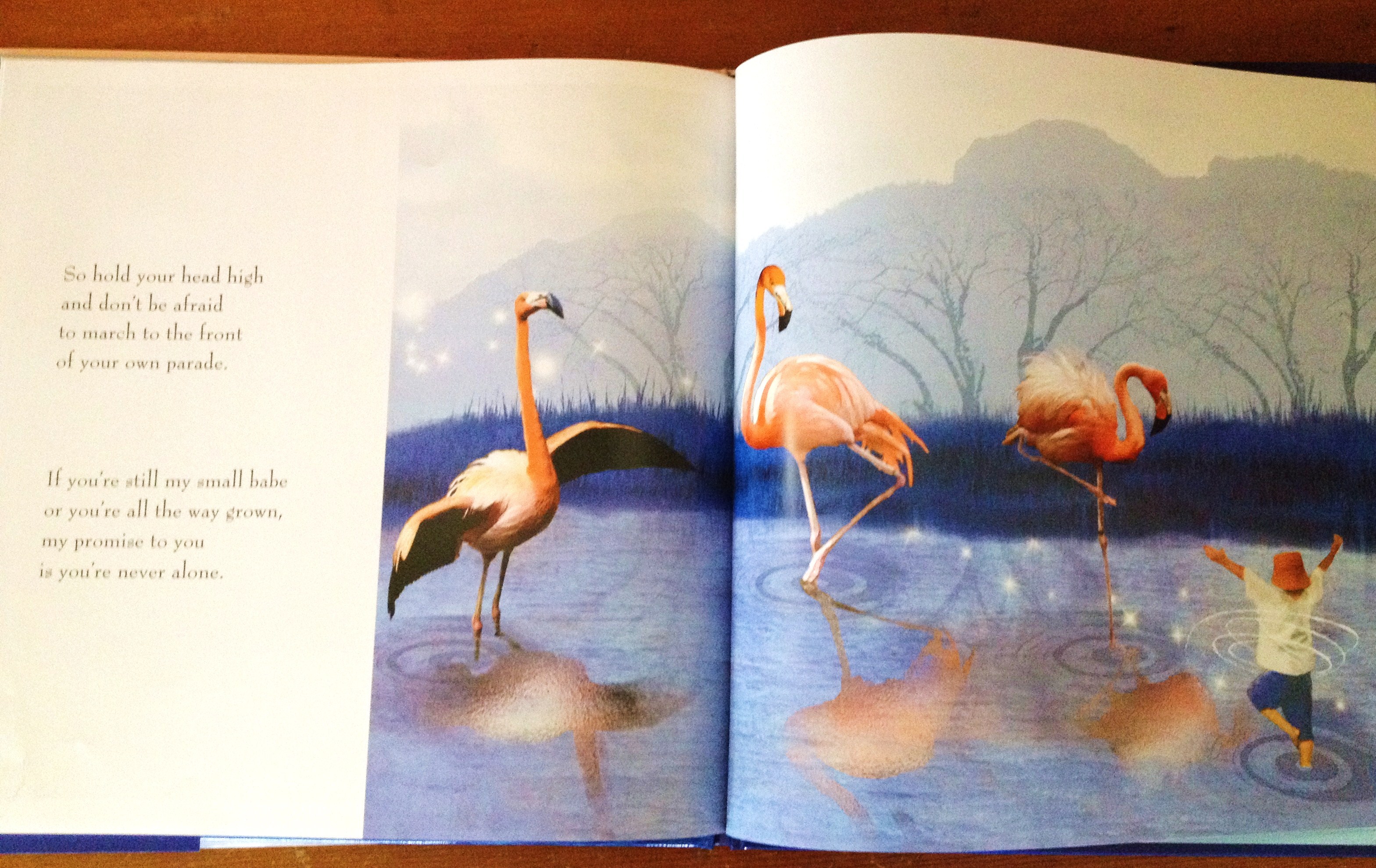
This morning, I was reading a book to my 10-month old son and these words jumped out of the page at me.

Climb any mountain…climb up to the sky!

Make a big splash! Go out on a limb!

Hold your head high and don’t be afraid to march to the front of your own parade.

I love the picture of the little boy proudly making a splash and leading his parade in Nancy Tillman’s sweet book, “Wherever You Are, My Love Will Find You.”

March to the front of your own parade.

I don’t have to march to the front of your parade or The Pioneer Woman’s parade, or Seth Godin’s parade. My book, my career, my parade.

And better yet, I can hold my head high and be proud of what I do have to offer, the areas I do excel in, and the gifts God wants me to share. I don’t have to measure up to anyone else. I’m uniquely me!

Instead of thinking of it as building our platform, we could just pretend we’re marketing to the front of our own parade. Doesn’t that sound more fun and less intimidating?

Imagine a parade about you and your books, where the collection of floats tells a story. Each float celebrating a part of who you are, what you believe in, what your expertise is, what your passions are, what your books are about, what you are like.

If each of your blog posts, tweets, Facebook statuses, and online bios is a float, does your current collection of floats look like the parade you imagined for yourself? Do you think people are inviting their friends to come watch your parade? Are they jumping in and marching along with you? Is fear of failing, judgement, or not measuring up keeping you from proudly stomping around and letting yourself be seen and heard?

Hold yourself high, and don’t be afraid to march to the front of your own parade. – Nancy Tillman, Wherever You Are, My Love Will Find You

The Best Resource to Build Your Author Platform

Are you so sick of the word platform you want to throw all wooden boxes into a huge bonfire?

Everywhere authors turn we hear about the importance of author platform. Many pre-published authors have no idea how to go about building a successful author platform. You just know that you need one.

Even seasoned authors know we need to keep adding planks to our platform, making it larger every day.

I was one of 100 people recently chosen to participate in the launch of Michael Hyatt’s new book, Platform: Get Noticed in A Noisy World.

This in itself was pure genius. Every one wants the invitation to the private party, we want the behind the scenes all access pass. To read the call out, here’s the link to Michael’s invite. Did you notice it’s not just about what you can do for him, but what it will do for you?

That is the number one lesson from this book. Everything you put in front of your readers, from blog posts to social media updates, must provide value to them!

Michael really knows how to take this to the next level. Here’s the link to his Platform book page. He breaks down the benefits his book provides to the reader. Many books, or book pages, fail to spell out what the purchaser will get from reading them.

This book doesn’t just tell you a few key points or things to do, it teaches you. Michael provides numerous links to extra info and also gives tons of examples. I’m a visual learner, so this is key for me.

God has been reminding me that it’s not about me. And the same is true in all aspects of our lives, as both authors and human beings. I ultimately write for God’s glory, and adding glory for Him is what’s all about. Remember to always add value, in everything we do.

What are ways you can add value to your book? How can you add value to the readers of your blog? How has an author added extra value for you?

Here’s an added value if you haven’t already read 7 Tips for Self-Editing Your Novel with Promotional USB Drives Before we can create a platform, our content must be amazing.

Goodreads

Here is some Social Media just for authors and just for readers. You are probably thinking, “Am I dreaming?”

No! It does exist, and it is an amazing place to devote time and energy. This little heaven for authors is called Goodreads. Goodreads has approximately 4.6 million users. While it may not seem to be as grand as Facebook’s 800 million users, these 4.6 million users are just on Goodreads as readers!

Goodreads is a place people go to only to think about reading. What an awesome concept. There are no random pictures of kids, like on Facebook, pictures of things you can’t afford like on Pinterest. Instead, there are readers, some virtual books shelves, and people talking about BOOKS!  Think about this as Facebook just for authors and their audience.

What are some of the things that you can do on Goodreads?  You can create an author page that “fans” can share with others.  Within Goodreads, you can also start pages specifically for your book. ( I do not encourage people to start book pages on Facebook, just fan pages.  But on Goodreads, you can have both, and they link back to your author page.)  It’s designed just for you, the author. You can easily chat with your readers, add video clips, and link it to your Facebook and/or Twitter pages.

I recommend to authors that they spend money on Facebook, programming a page with their books, so it directs them to buy the author’s books. If you are an author with many books, start a store on your fan page. Goodreads does this for you! (Score!) If your book is on Amazon or Barnes and Noble, it is automatically connected to Goodreads.

Goodreads is super user friendly and very intuitive.  When you sign in, there are tips and tricks that are posted on their pages everyday.  It will give you more ideas and walk you through the site.  This makes it very easy to learn and be more adept in controlling the site. Have fun with this site, and don’t just put your books on it, but really get involved. Dialogue with friends, readers, and other authors.

These were my three tips from Goodreads when I signed in today.

My personal favorite thing on Goodreads is their quote section.  You can add quotes from your book or quotes from your favorite author. I love to search the quotes by words and topics. There are no ads with these quotes, and it is such a great resource for writing. Quotes are also a good way to promote yourself!

Goodreads is definitely a top social networking site for authors.

Go here to start your adventure as a Goodreads author. Also, here is some great information about how to effectively utilize all that Goodreads has to offer: Using Goodreads to Promote Your Books

Have you been using Goodreads to promote your writing? How so?